FOR THE FAMILY MEMBER WHO ENDED UP IN CHARGE

Everybody asks how they can help.Now there’s an answer.

Make the care plan together. Agree on who can handle what, assign tasks and backups, and let everyone see the updates. Keep medications, incidents, appointments and printable doctor reports in the same place. Because the whole plan shouldn’t have to live in one person’s head.

Three quick questions, then secure checkout. Free for 7 days with a card required; then $79/year or $9/month unless you cancel before the trial ends.
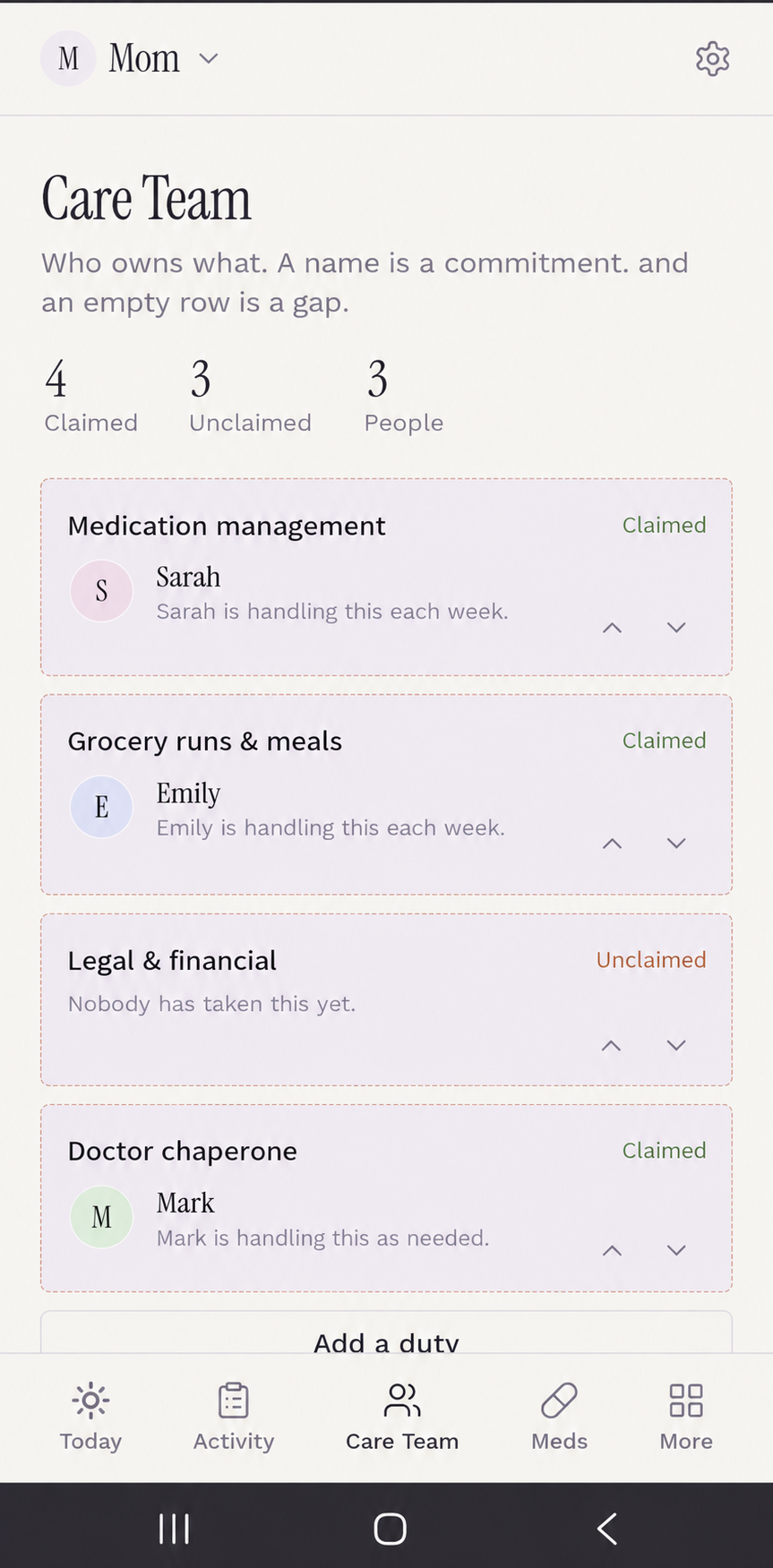
Actual Care Command HQ Care Team app interface with sample family assignments, four claimed tasks and three unclaimed tasks
Inside the real app · illustrative family data
01Agree on who does what

Decide together what each person can realistically handle.

02Name a backup

Have a plan when somebody can’t make it.

03See what happened

The person handling the task adds the update.

SHARED CARE, NOT JUST SHARED NOTES

“Just tell me what you need.”Finally, there’s an answer.

Get the people who can help on the same page, whether around the kitchen table or five states apart. Talk through what’s realistic, agree on who’ll handle each task, and choose a backup for when plans change.

Start with preloaded duties or add your own, including groceries, appointments, overnights, medication check-ins, and whatever your family actually needs. The person handling a task can leave notes for everyone else.

Less chasing. Less guessing. Less of the whole plan living in your head.

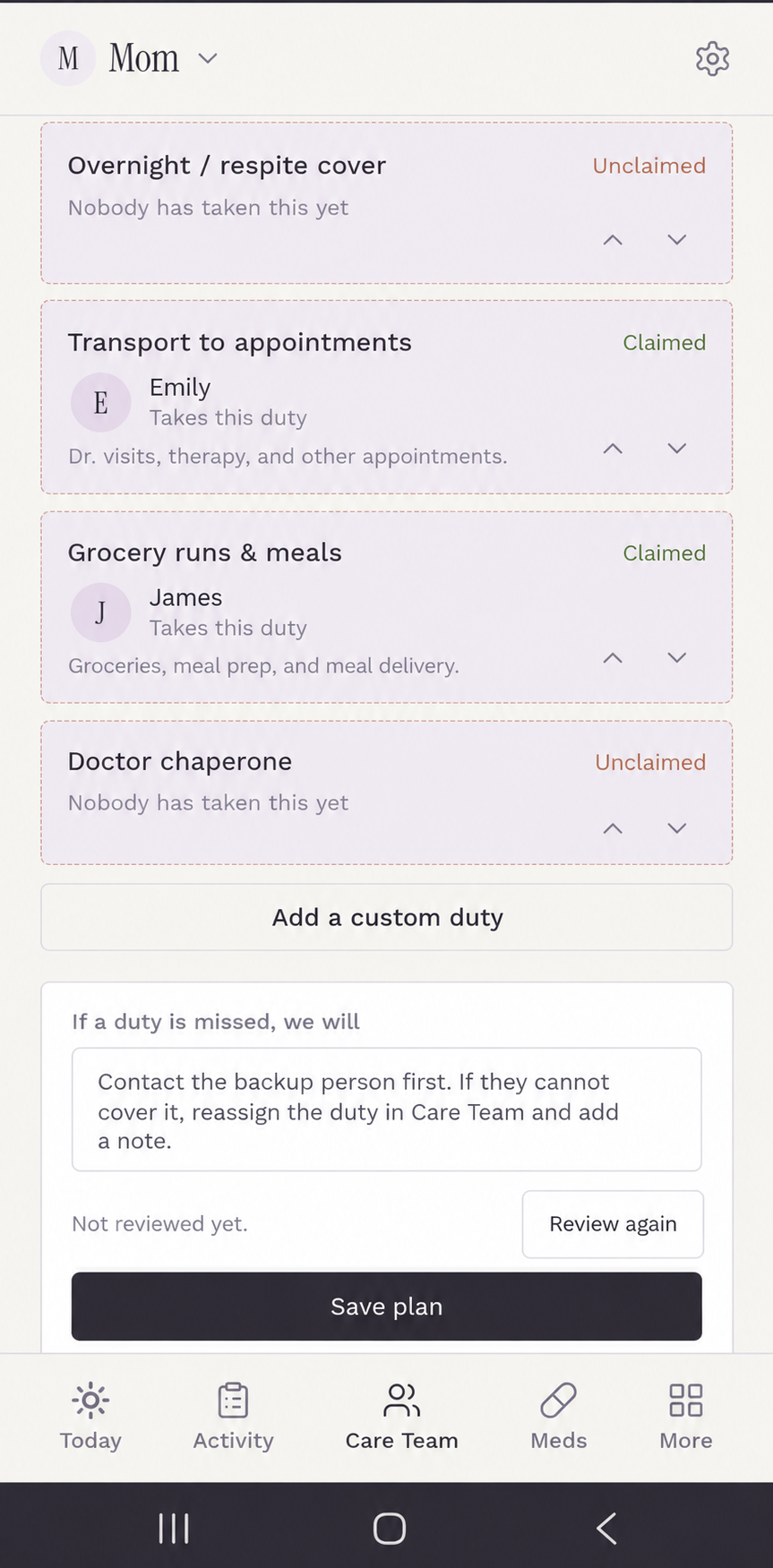
Real Care Team interface showing claimed and unclaimed caregiver duties, a custom duty button, and a contingency plan with illustrative entries
REAL APP INTERFACE · SAMPLE DATA

There’s room for your family’s way of doing things.

Keep the suggested duties. Add the ones only your family would know about.

01 / Make it together

Decide what’s realistic.

Talk about schedules and capacity instead of assuming who will do what.

02 / Give it an owner

Make the plan visible.

Assign each task, choose a backup, and keep recurring work out of the text thread.

03 / Close the loop

Let the person doing it report back.

The person who handled the task can leave an update, so the next caregiver doesn’t have to start with another round of calls.

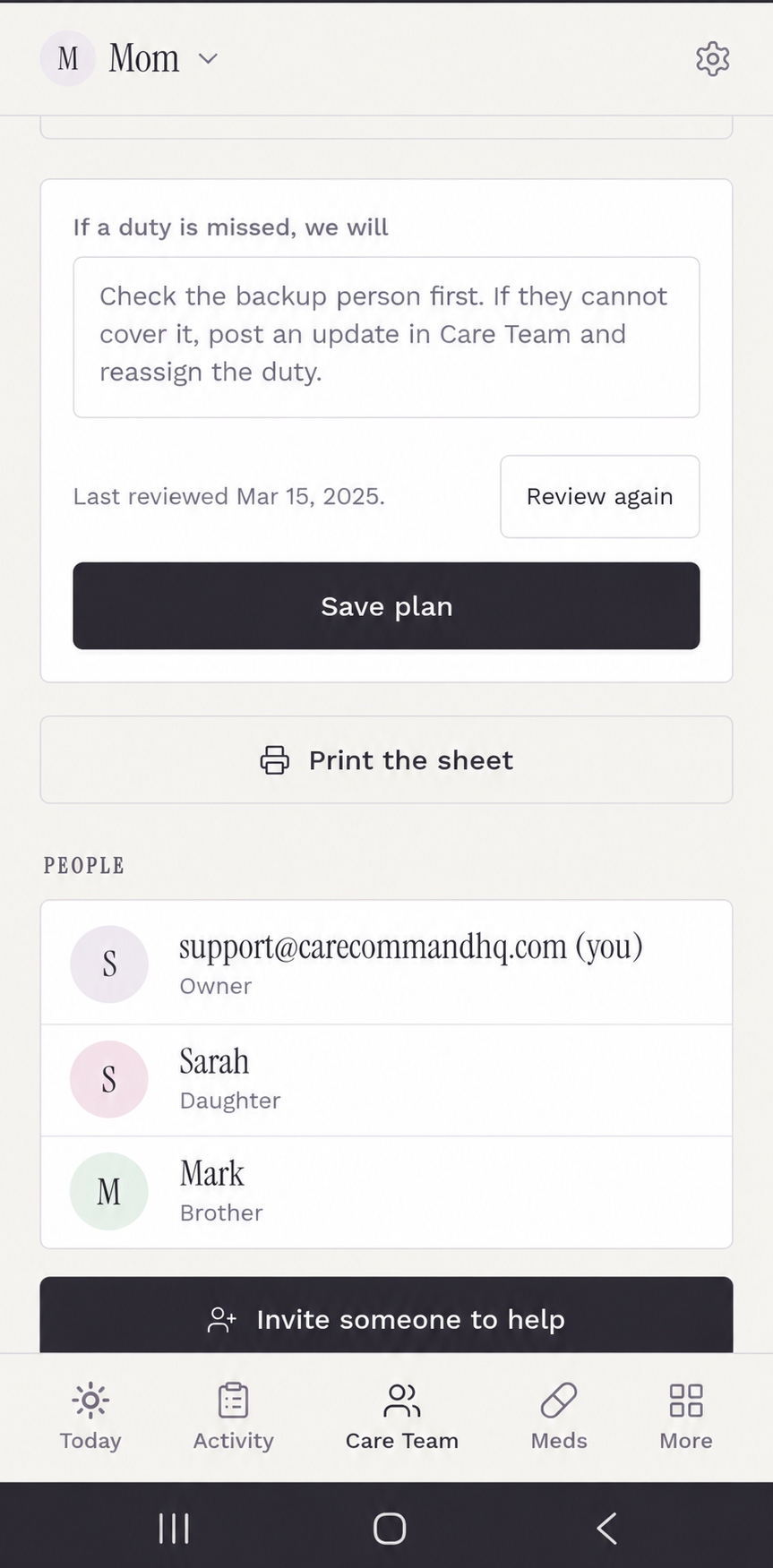
Care Team plan and people screen with illustrative family names, a contingency plan, and an invite someone to help button
ONE PLACE FOR THE PEOPLE, TOO

Make it an actual team.

Invite the people who are helping and keep the plan where everyone can find it. Preloaded duties give you a starting point; your family can add its own.

Real CCHQ app screenshot with illustrative sample information.

Want to see what a shared care plan could look like for your family?

See how it works for my family →Three quick questions · Then choose your plan
SOUND FAMILIAR?

If you’ve said any of these things this week,you’re in the right place.

Different households. Remarkably familiar conversations.

THE FAMILIAR OFFER

They keep saying, “Just tell me what you need.”

Which somehow means you still have to make the list, find the people and remind everyone.

What changes: Agree on the tasks together, name who’s handling each one, and keep updates where the family can find them.

THE WORK NOBODY SEES

You did the overnight, groceries, and appointment.

The work gets done. But nobody sees how much it takes or what still needs doing.

What changes: A shared task plan shows who took responsibility and what they reported back.

THE MEDICATION QUESTION

“Did she actually take that pill?”

Someone gave the dose. Someone else wasn’t there. Now you’re reconstructing Tuesday.

What changes: Keep medication doses and refusals in the shared record, rather than in separate memories.

THE TEN-MINUTE APPOINTMENT

The doctor asks how the last six weeks went.

Everything you’ve dealt with suddenly turns into “It’s been a lot.”

What changes: Bring dates, incidents, refusals and notes together in a report you can print.

THE 9 P.M. MYSTERY

Every evening seems to go sideways at the same time.

You wonder if there’s a pattern, but by morning the details blur together.

What changes: Log dated incidents while they’re fresh, so possible patterns are easier to spot and explain.

THE PAPERWORK PANIC

The hospital wants the medication list. Right now.

You know you wrote it down. Somewhere. But where?

What changes: Keep key details organized so you know where to look when the call comes.

THE FAMILY GROUP TEXT

“Wait. Who’s taking her on Thursday?”

Everybody thought somebody else had it covered. Now you’re the emergency scheduling department.

What changes: Put responsibilities and backups in one shared care plan.

THE INVISIBLE MENTAL LOAD

You love them. You’re tired of being everyone’s reminder app.

You’ve become the person who remembers what everyone else needs to remember.

What changes: Put the assignments and updates somewhere everyone can check, instead of keeping them all in your head.
THE BIGGER PICTURE

It’s not just your household.

Caregiving is a massive job that families are expected to somehow coordinate on their own.

63 million

American adults provided ongoing care to adults or children with a medical condition or disability in the 2025 report.

44%

Of family caregivers were in high-intensity situations using the traditional Level of Care Index.

Source: AARP / National Alliance for Caregiving, 2025 Executive Summary and Level of Care Index. The 63 million figure includes caregivers for adults and children and is not limited to unpaid care.
THE INFORMATION PART MATTERS, TOO

When someone asks what happened,you have something better than “I think.”

The care plan handles the who. Your records capture what happened, when it happened, and what to bring to the doctor.

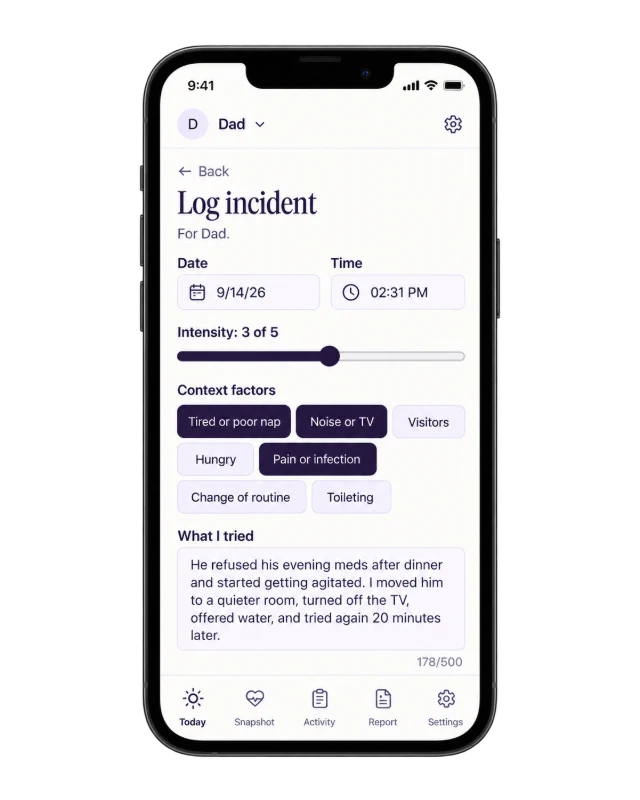
Actual incident and refusal recording screen with illustrative information

Record the refusal.

Log a medication refusal, a sundowning episode, or a fall while it's still fresh. Speak your notes instead of typing when you need to.

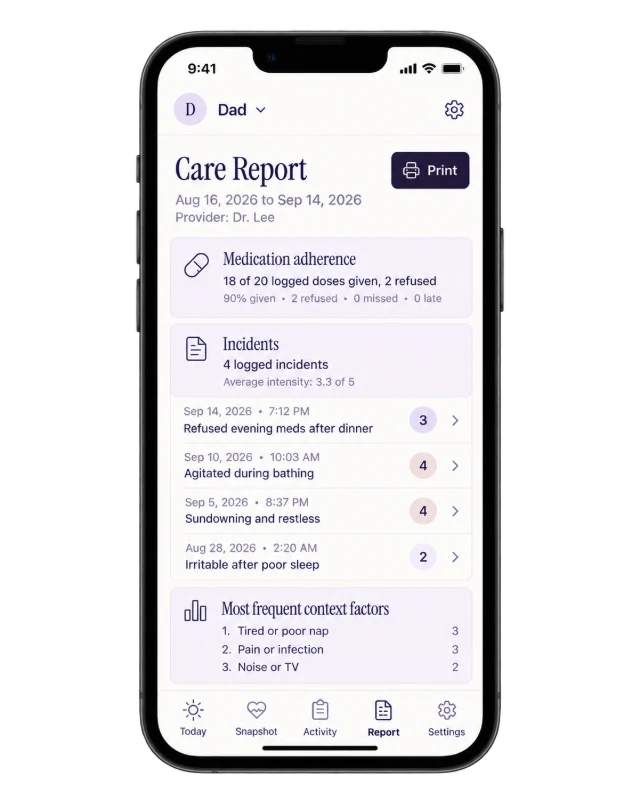
Actual doctor report screen with illustrative sample entries

Bring the facts.

Pull details into a doctor report you can show on your phone or print for the appointment.

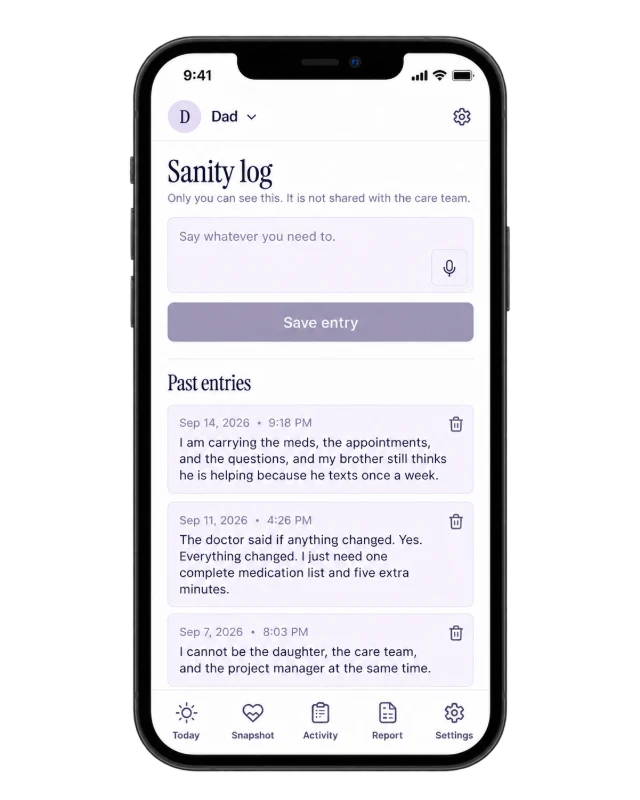
Actual private Sanity Log screen showing illustrative sample information

Keep one corner private.

Sometimes you need to vent, not send another family update. Type it or speak it into your private Sanity Log. Save it just for yourself, then search it later if there’s something you need to remember.

Screens shown are from the app with illustrative sample information. Care Team examples shown are also actual app interfaces filled with illustrative sample information.
WHY THIS IS DIFFERENT

The binder, the group text, the hospital portal.They each do one job.

CCHQ connects the day-to-day care work with the record of what happened.

Group texts
Good for talking. Hard for finding the person who agreed to Thursday overnight three weeks ago.
Paper notes
Useful at home. Less useful when the one person who has them isn't at the appointment.
Patient portals
They know the clinic visit. They don't know about Tuesday evening's refused dose or who handled groceries.
Care Command HQ
One place for the family's plan, weekly task updates, medication and incident logs, and printable doctor reports.
SIMPLE TO START

Try the plan for a week.See what gets lighter.

One shared plan for the people helping, plus the records you need when questions come up.

THE COMMAND CENTER · ANNUAL MEMBERSHIP
$79 / year after trial

One shared place for the whole care team.

One shared care plan for your family. Includes the printable Caregiver Command Binder.

  • Agree on and assign recurring or custom tasks
  • Primary owners, backups and weekly updates
  • Medication, incident and appointment records
  • Doctor report and private Sanity Log
  • Printable Caregiver Command Binder included
See my 7-day free trial →
Prefer month to month? Try the $9/month plan.

Card required. $0 for 7 days, then the chosen plan auto-renews unless cancelled before the trial ends. You can cancel before the trial ends to avoid the first charge.

PREFER PEN AND PAPER?
$27 / one-time

The printable Caregiver Command Binder.

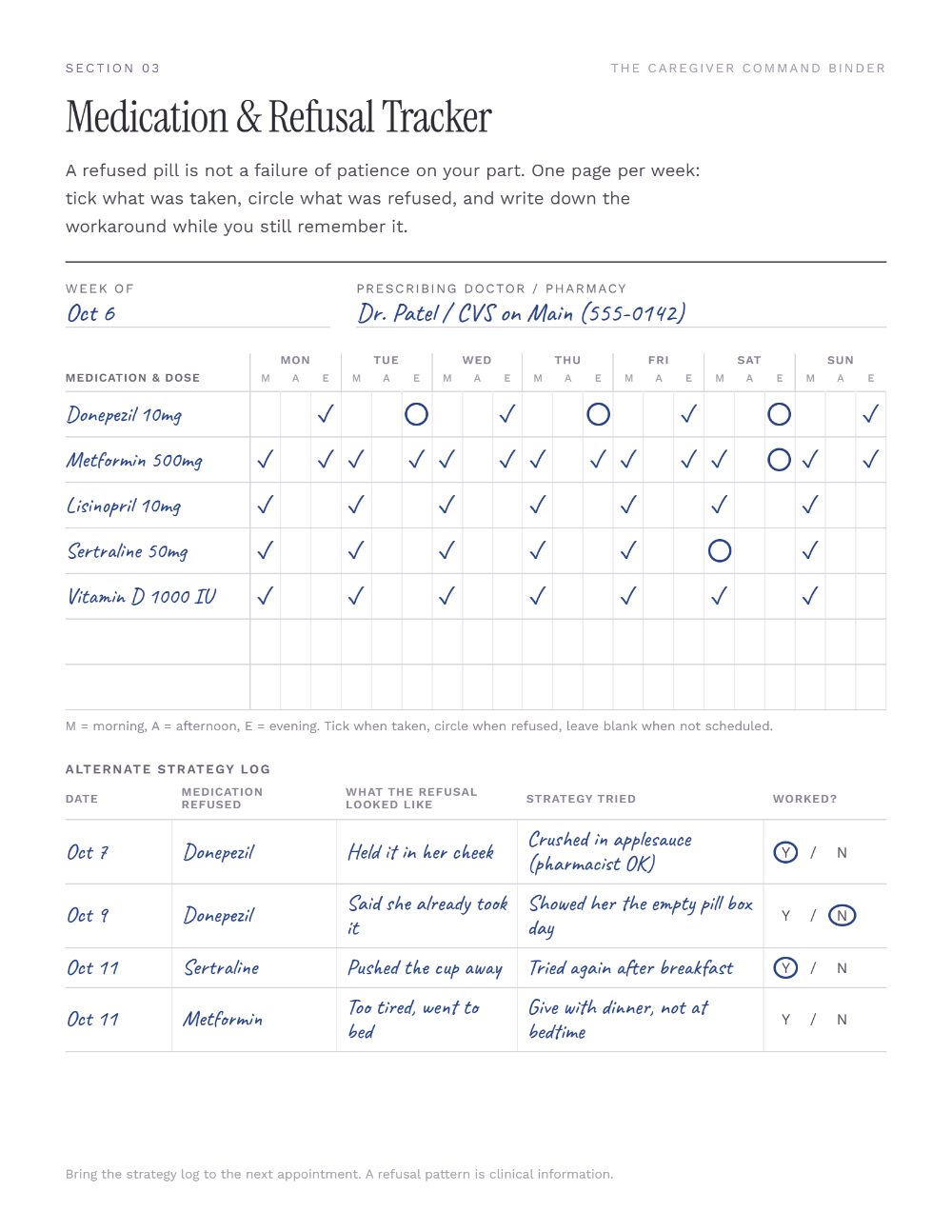
Nine usable fill-in pages for medications, appointments, incidents and contacts. Print what you need, for your household, without another subscription.

Sample filled-in Caregiver Command Binder medication pageGet the printable binder, $27

Already choosing the annual app plan? The printable binder is included. No need to buy it separately.

Tia Thompson, founder of Care Command HQ
WHY I BUILT IT

I built the systemI wish we’d had.

In 2024, I lost both of my parents just 30 days apart. During their care, our family was juggling medications, appointments, schedules, and all the little things that become big things.

Everyone was doing their best. But I kept wishing we had one shared place for the plan, the updates and the information. That’s why I built Care Command HQ.

Caring for someone you love is hard enough. Keeping everyone organized shouldn’t make it harder.

Tia, founder of Care Command HQ
THE PRACTICAL QUESTIONS

Before you choose a plan,a few fair questions.

How does the 7-day trial work?

Choose monthly or annual, enter a card at Stripe checkout, and pay $0 during the first seven days. Unless you cancel before the trial ends, the selected subscription starts billing automatically at $9/month or $79/year.

How do we agree on tasks?

Talk through what each person can realistically handle, whether together in person or from different states. Then record the plan in CCHQ, with a primary person, a backup and notes. The app helps everyone see commitments; it cannot guarantee a task gets done.

Can we add tasks that are specific to our family?

Yes. Start with preloaded duties such as grocery runs or appointments, then add your own. Your family decides what belongs on the plan.

What if someone can’t cover their task?

Name a backup and agree on what the family should do when someone can’t make it. Keep that plan with the duties so nobody has to guess what happens next.

Do I have to invite family?

No. You can start on your own and bring other caregivers into the shared care plan when you are ready.

What can invited care-team members see?

Care information is shared within the invited care team, based on the access you assign. Your Sanity Log is private to you, not visible to other members. Do not enter information you are not authorized to share.

What if I only want printable pages?

The $27 Caregiver Command Binder has nine fill-in pages you can print for your household. It is a separate one-time purchase and does not include app access. The annual app offer includes the binder.

Do I install an app?

No app-store installation is required. The Command Center works as a web app on your phone and can be added to your home screen.

Can I cancel?

Yes. Use your Stripe billing management link or contact support@carecommandhq.com. Cancel before the end of the trial to avoid the first charge. Cancelling after a paid renewal prevents future renewals and does not itself reverse the charge.

What if I forget to cancel?

You can cancel future renewals through the Stripe billing portal. After a charge, subscriptions are ordinarily nonrefundable for changes of mind. For billing errors or access issues, contact support@carecommandhq.com. See the Terms for details.

Does this replace a doctor?

No. It organizes family observations and records so you can share better information with health professionals. It is not medical, legal or financial advice.

MAKE ROOM FOR THE WHOLE TEAM

You can love your family.And still want an actual plan.

Agree on the work. Assign it. Keep the record. Let the app be the organized one for a change.

See how it works for my family →

7-day trial · $0 today · Card required · Cancel before the trial ends to avoid a charge